
Your ChatGPT prompts,
one command away
Stop switching tabs and searching for prompts. Access your entire prompt library in two seconds with Ctrl+Shift+P.
No account required. 100% free forever.
Tired of workflow disruption every time you need a prompt?
If you're using ChatGPT regularly, you know the frustration:
❌ You're constantly switching tabs between ChatGPT and your prompt document
❌ Your prompts are scattered across Google Docs, Notion, text files, and browser bookmarks
❌ You waste time scrolling through long documents trying to find the right prompt
❌ Your workflow gets disrupted every single time you need to copy a prompt
Every tab switch breaks your focus. Every search through a document wastes time. And if you're reusing the same prompts multiple times per day, those interruptions add up fast.
There has to be a better way to save and access your ChatGPT prompts.
Access your entire prompt library in two seconds, from any app
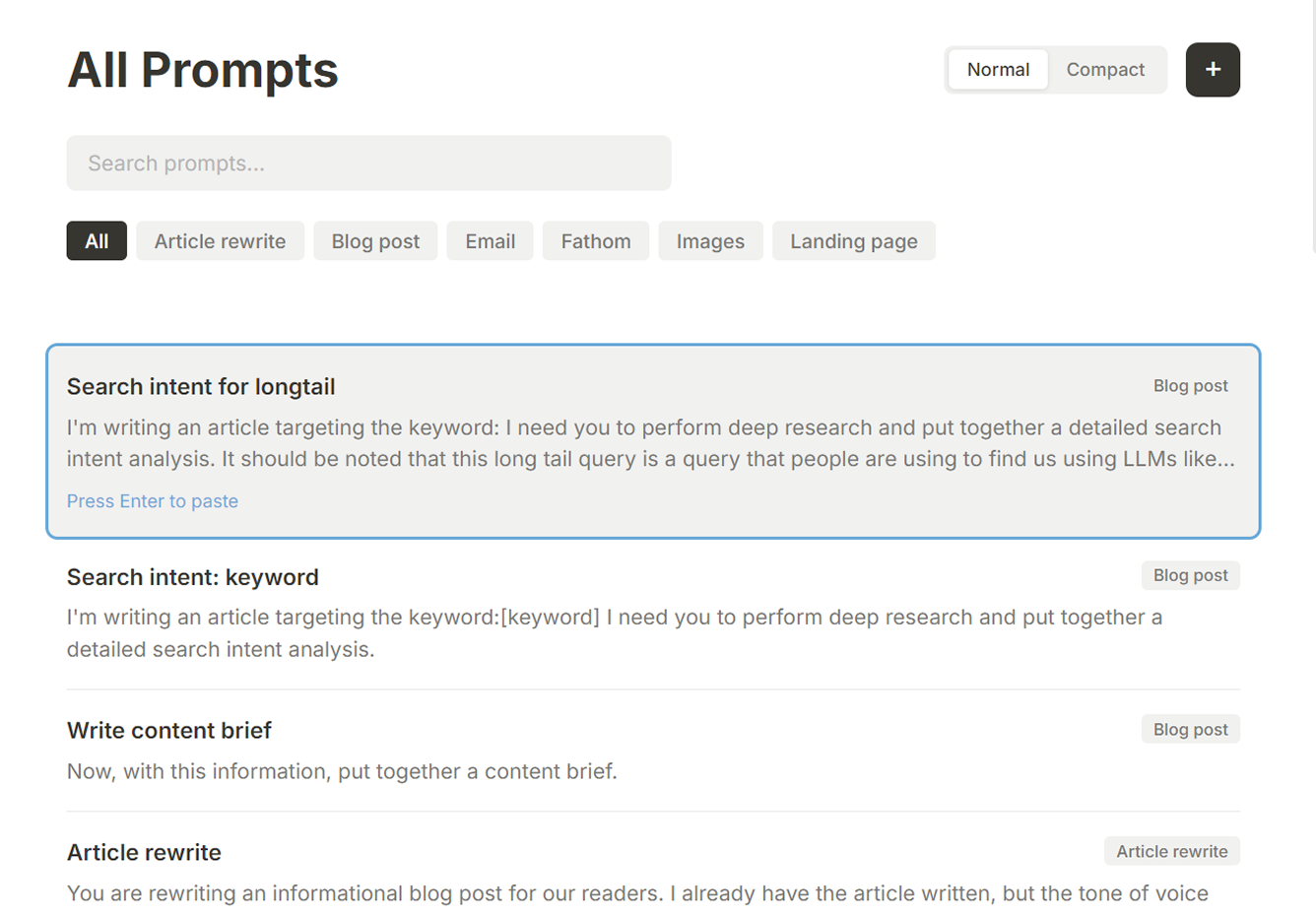
Prompt Paster is a free Windows desktop app that gives you instant keyboard access to all your saved prompts. No more tab-switching. No more searching through documents. Just press Ctrl+Shift+P and your prompts appear.
Build your prompt library
Save all your prompts, templates, and snippets in one organized, searchable place. Import from your existing documents or start fresh.
Press Ctrl+Shift+P
From any application, press Ctrl+Shift+P to instantly pull up your prompt library. No need to leave what you're working on.
Select and paste
Choose your prompt and it pastes instantly into ChatGPT, Claude, Notion, Google Docs, or anywhere you're typing.
Your prompts go from scattered and hard to find to instantly accessible with a single keyboard shortcut.
Everything you need to manage your ChatGPT prompts
Keyboard shortcut access
Press Ctrl+Shift+P to instantly open your prompt library from any application. Press Ctrl+Shift+O for quick search to find prompts in seconds. Never leave your current window or break your flow.
Organized prompt library
Store all your prompts, templates, and snippets in one place. Search instantly, organize by category, and keep everything accessible. Finally consolidate all those prompts scattered across different documents and tools.
Workflow organization
Group related prompts into sequential workflows. For example, create a content workflow with outline, write, and polish prompts that run in sequence. Perfect for multi-step processes you repeat regularly.
Universal paste
Works with ChatGPT, Claude, Gemini, and any AI tool. Also works in Notion, Google Docs, Slack, email, and any application where you type. One tool for all your prompt needs, everywhere you work.
Offline and private
All your data is stored locally on your computer. No account or sign-in required. Works completely offline. Your prompts never leave your device, so your data stays completely private.
Exportable data
Export your entire prompt library as JSON files anytime. Back up your prompts, move them between computers, or keep archives of your library as it evolves.
Why choose Prompt Paster as your ChatGPT prompt saver?
vs. Google Docs / Spreadsheets
Google Docs works for storing prompts, but accessing them means tab-switching, scrolling, and copying manually. Prompt Paster gives you instant access with keyboard shortcuts. No tab switching. No searching through documents. Your prompts appear in two seconds, right where you're working.
vs. Browser extensions
Browser extensions only work in your browser and are limited to specific AI tools. Prompt Paster is a desktop app that works with ALL applications. Use your prompts in ChatGPT, Claude, Notion, Google Docs, Slack, email, or anywhere you type. More reliable, faster, and no browser dependencies.
vs. Custom GPTs (ChatGPT Plus)
Custom GPTs require a $20/month ChatGPT Plus subscription and only work within ChatGPT. Prompt Paster is completely free and works with free ChatGPT, Claude, Gemini, and any other AI tool. Plus, you can use your prompts anywhere you type, not just in ChatGPT.
vs. Cloud-based prompt managers
Cloud-based tools require accounts, subscriptions, and internet connections. Your prompts live on someone else's servers. Prompt Paster stores everything locally on your computer. Complete privacy, works offline, no subscription fees, and your data stays yours.
Frequently asked questions
Is Prompt Paster really free?
Yes. Completely free, no hidden costs, no subscription, no feature limits. Download and use forever at no charge. We built this because we needed it ourselves, and we wanted to make it available to everyone.
What operating systems does it support?
Prompt Paster is currently available for Windows. Mac and Linux versions may come in the future, but right now it's Windows only.
Does it only work with ChatGPT?
No. While it's optimized for ChatGPT users, Prompt Paster works with any AI tool including Claude, Gemini, Perplexity, and others. It also works in any application where you type text, like Notion, Google Docs, Slack, or email.
Is my data private and secure?
Absolutely. All your prompts are stored locally on your computer. Nothing is uploaded to the cloud or shared with anyone. Your prompts stay completely private. No account required means no one else ever sees your data.
Do I need a ChatGPT Plus subscription?
Not at all. Prompt Paster works with free ChatGPT, ChatGPT Plus, and any other AI tool you use. You don't need to pay for anything to use Prompt Paster and access your prompts instantly.
Can I import my existing prompts?
Yes. You can import prompts from text files, CSVs, or copy-paste from wherever you currently store them. Bring all your existing prompts into Prompt Paster and consolidate them in one place.
How do I update my prompts?
Editing is simple. Click any prompt to edit its text, name, category, or tags. Changes save instantly. You can also create multiple versions of the same prompt and keep what works best.
What if I want to back up my prompts?
You can export your entire prompt library as a JSON file anytime. Back it up to cloud storage, an external drive, or anywhere you want. Your prompts are yours to keep and move as you need.
Get your prompts one command away
Stop wasting time switching tabs and searching for prompts. Download Prompt Paster free and access your entire prompt library in two seconds with Ctrl+Shift+P.
No account required. No credit card needed. 100% free forever.
Works with ChatGPT, Claude, Gemini, Notion, Google Docs, and any app where you type.